Why I Built SpotAsk
Recently, I transitioned my primary daily workspace to macOS and built my first native desktop app: SpotAsk.
The motivation was simple: when I open ChatGPT, I rarely need it for elaborate multi-step tasks. Most of the time, I just want to clarify a concept, translate a paragraph, summarize an article, or polish a quick email reply.
Yet completing such small tasks often requires a heavy routine: pause what you’re doing, open a browser, navigate to the AI web app, wait for a reply, and switch back.
Doing this once or twice is fine. But repeat it dozens of times a day, and it feels exhausting—a 5-second question gets weighed down by a heavy workflow.
Not every question needs you to open ChatGPT.
Core Philosophy: Keeping Lightweight Queries Truly Lightweight
SpotAsk is a native macOS menu bar application that stays out of your way until called. Press the default hotkey Option + Space to bring up a focused query window. Type your question, inspect the answer, copy what you need, and press Esc to dismiss it. The entire interaction happens without interrupting your active workflow; once dismissed, it’s as if it was never there.
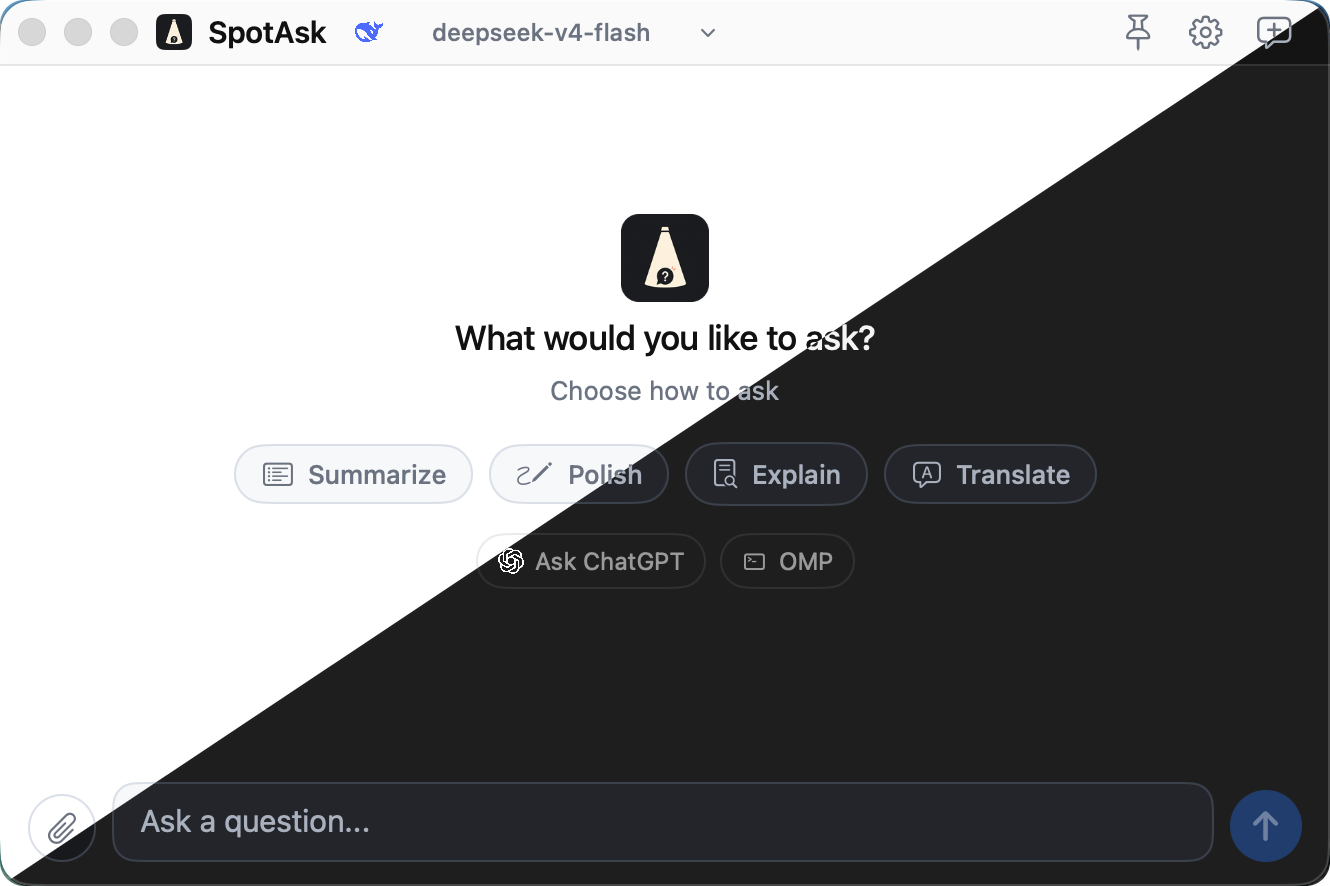
I didn’t want a massive AI workbench; I wanted the shortest possible path: from “I have a question” to “I have the answer and I’m back to work” without friction.
This principle guided several key design decisions:
- Keyboard-First: Invoke, query, copy, and dismiss entirely via keyboard shortcuts—no mouse needed.
- Minimalist Interface: The window focuses purely on quick Q&A without cluttering your screen with heavy workspaces, team collaboration, or bulky history sidebars.
- Local-First & BYOK: SpotAsk uses a Bring Your Own Key (BYOK) model. Your API keys stay stored securely on your Mac, and queries are sent directly to your configured AI provider.
- Clear Boundaries: Deep research, multi-agent workflows, and complex coding remain with dedicated tools like ChatGPT and Claude/Codex. SpotAsk exclusively handles high-frequency, lightweight tasks.
Two Core Use Cases
SpotAsk currently revolves around two everyday workflows.
The first is Quick Query. Press Option + Space to invoke the prompt, type your question, and hit Return to stream the response in real-time. You can copy the entire answer or just an individual code snippet; hit Esc or click Stop anytime to interrupt.

The second is Text Selection Actions. Select any text in Safari, Apple Notes, Mail, or any macOS application, and SpotAsk presents quick contextual actions right beside your selection. Translate, explain, summarize, polish, or run a custom prompt. In apps that support direct text replacement, SpotAsk can write the result straight back into your document.
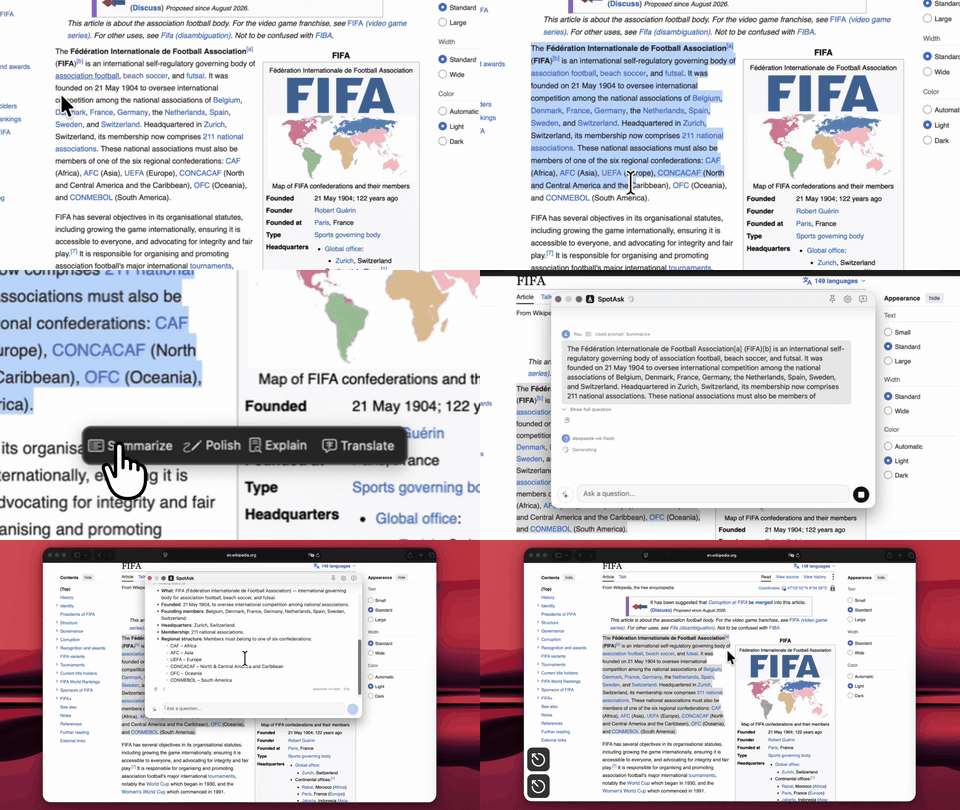
Additional native details make it feel at home on macOS: customizable global hotkeys, built-in prompt presets, pasting screenshots or dropping files as context, support for 8 interface languages, and integration with Spotlight, Siri, and Shortcuts.
Design Boundaries: Deliberately Avoiding the “All-in-One” Trap
The hardest part of product design is often not what to add, but what to resist adding.
SpotAsk is intentionally not an all-in-one AI workspace. There are no accounts, no cloud sync, and no heavy workspace trees. When a task requires deep retrieval, complex multi-step reasoning, or iterative debugging, specialized tools remain the right choice.
SpotAsk’s focus is razor-sharp: solving those moments where a tiny question forced you to open a heavy tool.
Why “SpotAsk”?
Coming from Windows, I loved keyboard-driven launcher utilities like Listary. Moving to macOS, Spotlight became second nature—I loved the feeling of getting things done in just a few keystrokes.
Later, I tried full-featured clients like Cherry Studio for quick queries, but they felt too heavy for my workflow. I didn’t want a giant desktop suite just to ask a quick question.
That’s how SpotAsk came to life: a native, lightweight, and focused macOS AI query companion. The name reflects this duality—swift and unobtrusive like Spotlight, with the query itself (Ask) serving as the entry point.
Building My First macOS Desktop App
This is my first complete native macOS application. Throughout the journey, the biggest takeaway was not the technical challenge of Swift/SwiftUI, but how much harder it is to define and hold product boundaries.
Initially, it’s easy to want every feature competitors have. But every added knob lengthens the primary path. Eventually, I distilled my guiding rule to one sentence: If a feature doesn’t make asking a quick question faster, leave it out for now.
Current Status
SpotAsk supports macOS 15 and later, natively compatible with Apple Silicon and Intel Macs. Official releases are notarized and signed with an Apple Developer ID. The project is open source on GitHub under the AGPL-3.0 license.
- English Documentation: https://shiquda.github.io/SpotAsk/
- Releases & Downloads: https://github.com/shiquda/SpotAsk/releases
- GitHub Repository: https://github.com/shiquda/SpotAsk
If you frequently encounter moments where a small question interrupts your flow, give SpotAsk a try. Feedback, feature requests, and suggestions are warmly welcomed on GitHub Issues!