From Prompt to Personal Asset: How I Use Git to Manage Private Skills Across Devices
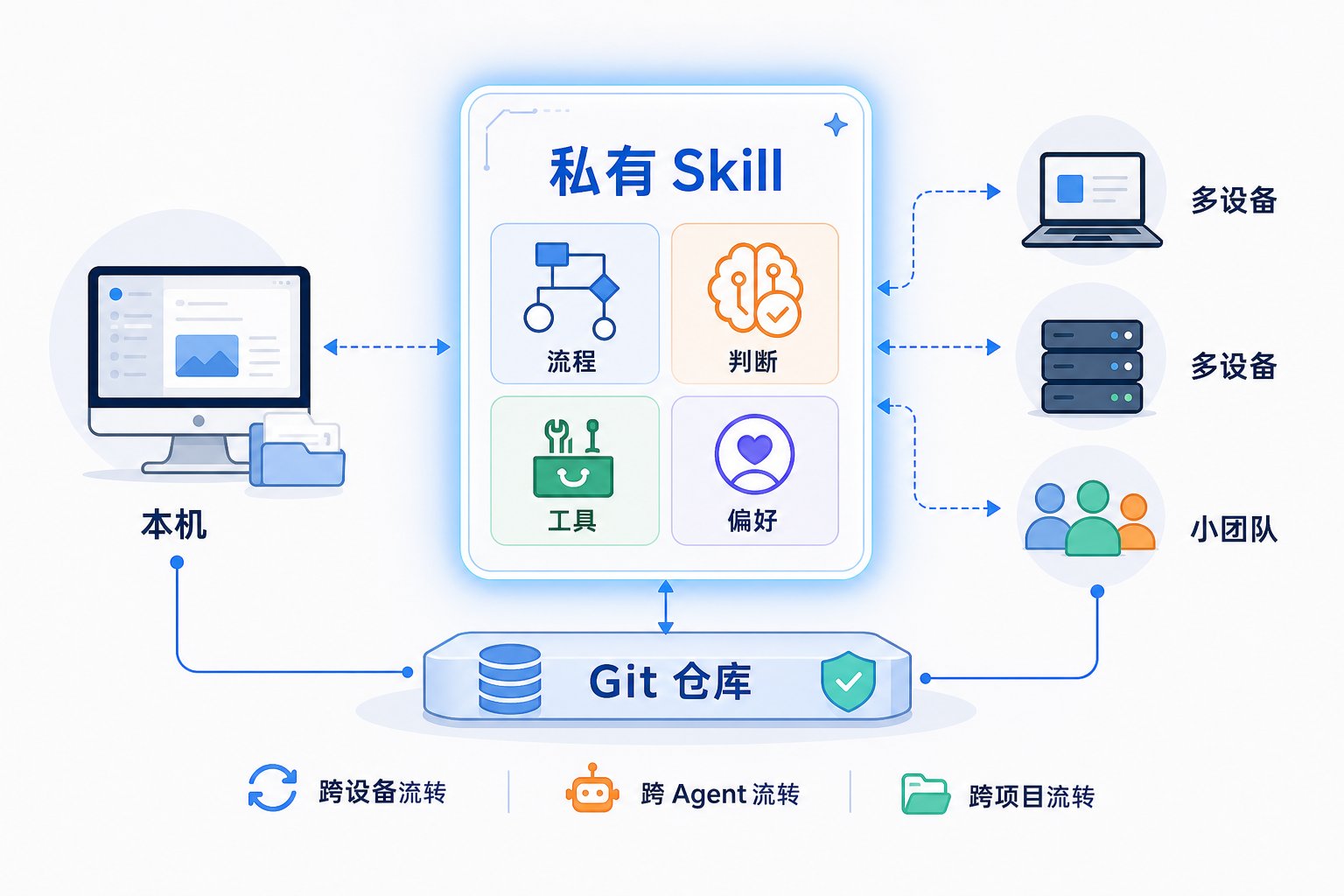
Lately, I’ve been working on something small: getting the Skills scattered across different Agents under control. At first, I didn’t think it mattered much—they’re just a few SKILL.md files with instructions, workflows, and tool-calling patterns. But the more I used them, the more I realized Skills shouldn’t be treated merely as “prompt files.” They’re more like personal assets—especially private Skills.
Public Skills certainly have value. Things like processing PDFs, reading and writing spreadsheets, invoking browsers, or running deployment checks are problems many people encounter. The community turns these capabilities into Skills that anyone can use out of the box—that’s the value of the ecosystem.
But my own take is this: the Skills truly worth long-term maintenance are usually the private ones.
The reason is simple. Public Skills solve “problems everyone runs into,” while private Skills solve “problems I keep running into.” The former is general capability; the latter is my way of working, my judgment standards, and my cognitive habits.
In other words, public Skills are like universal tools in a toolbox, while private Skills are more like my personal workflow manual.
What I want to share in this post is the lightweight setup I use now: no server deployment, just Git plus a local CLI. For the upload direction, I use my own skills-sync to sync local Skills to a Git repository. For the download direction, I use the mature npx skills add to install Skills from the Git repo. In between, Git handles version control and access control. This way, Skills can flow across devices, across Agents, and across projects.
Let me be clear upfront: this isn’t an installation tutorial, and I don’t plan to walk through every command in detail. Now that we’re in the Agent era, I increasingly prefer to leave those details to the Agent itself. Send it the repository URL and let it read the README first. If needed, install the Skill from the repo, then follow the Skill’s guidance to complete the rest. Human attention should go to judgment and acceptance, not memorizing a pile of command flags.
What Makes a Private Skill Worth Managing?
When I say “private Skill,” I don’t mean “secret capabilities that can’t be public.” I mean capability modules that are tightly coupled to an individual, a team, or a project.
They can be small. For example:
- What risks I focus on during code review.
- How I structure and tone my writing.
- What checks I run before publishing a blog post.
- What verification evidence I require from an Agent after it finishes a task.
They can also be larger. Like a paper-search workflow, a team delivery standard, a content creation pipeline, or even a long-formed research methodology.
These things share one trait: they may not be suitable for public release, and they may not be useful to everyone—but they’re extremely useful to me. So a private Skill isn’t fundamentally “a prompt written for a model.” It’s more like packaging my experience and preferences in a way an Agent can understand and invoke.
This is also why I believe private Skills deserve more careful management than public ones. Public Skills fill in general capability gaps; private Skills accumulate personal capability. The former makes an Agent more capable; the latter makes an Agent work more like it’s following “my method.”
Skills Are Knowledge Increments Beyond the Model
Base models are evolving quickly, and so are Agent products. Today you might use Claude Code, tomorrow Codex, and the day after that OpenClaw, Cursor, or OpenCode. If all your experience lives only in one product’s conversation history, that’s fragile. Switch products, switch devices, clear the context—and a lot of it is gone.
The value of Skills is that they extract a portion of experience out of any specific model or Agent.
A good Skill doesn’t need to be esoteric. As long as it clearly describes the applicable scenario, execution path, available tools, and acceptance criteria, an Agent can reuse that workflow across different models and products.
From this angle, a Skill can be understood as “knowledge increment beyond the model.” The base model provides general intelligence; the Skill layers on top of that intelligence with specific domain knowledge, personal preferences, and execution paths.
That’s precious.
Because models will only get stronger, but a model can’t naturally know “how I do things.” It can know paper search, code review, and copyediting in a general sense, but it doesn’t know my personal standards. Private Skills fill exactly that gap.
The Real Challenge Isn’t Writing Skills—It’s Managing Them
When you only have two or three Skills, management isn’t a problem. Keep them in some directory, and find them when needed. But once you use Agents heavily, you’ll quickly run into several issues.
The first is fragmentation. Different Agents have different Skill directories. Codex has its own global directory; Claude Code has its own. OpenClaw, OpenCode, and Cursor each have their own conventions too. Some Skills are project-level and live only in a specific repository.
The second is migration.
When you switch computers, you might remember to sync code, configs, and SSH keys—but you probably won’t remember which Skills are scattered where. By the time you actually need one, you discover it’s missing on the new machine.
The third is iteration.
Say I modify a Skill on my local machine, then use it on a VPS a few days later. The VPS still has the old version. Which version is current? What did I change last time? Did I break anything? If you’re relying on manual copying, this quickly becomes a mess.
The fourth is sharing.
In a small team, everyone might share common workflows—release processes, doc checks, code review, daily report aggregation. The hardest part isn’t writing a spec; it’s making sure every person’s Agent can reliably pull the same spec and receive updates afterward.
Put all these together, and it boils down to one sentence:
Once Skills evolve from a few scattered files into a long-maintained capability library, they should be version-controlled like code.
That’s ultimately why I chose Git.
My Approach: Git as the Repository, CLI for Upload and Download
My approach is simple:
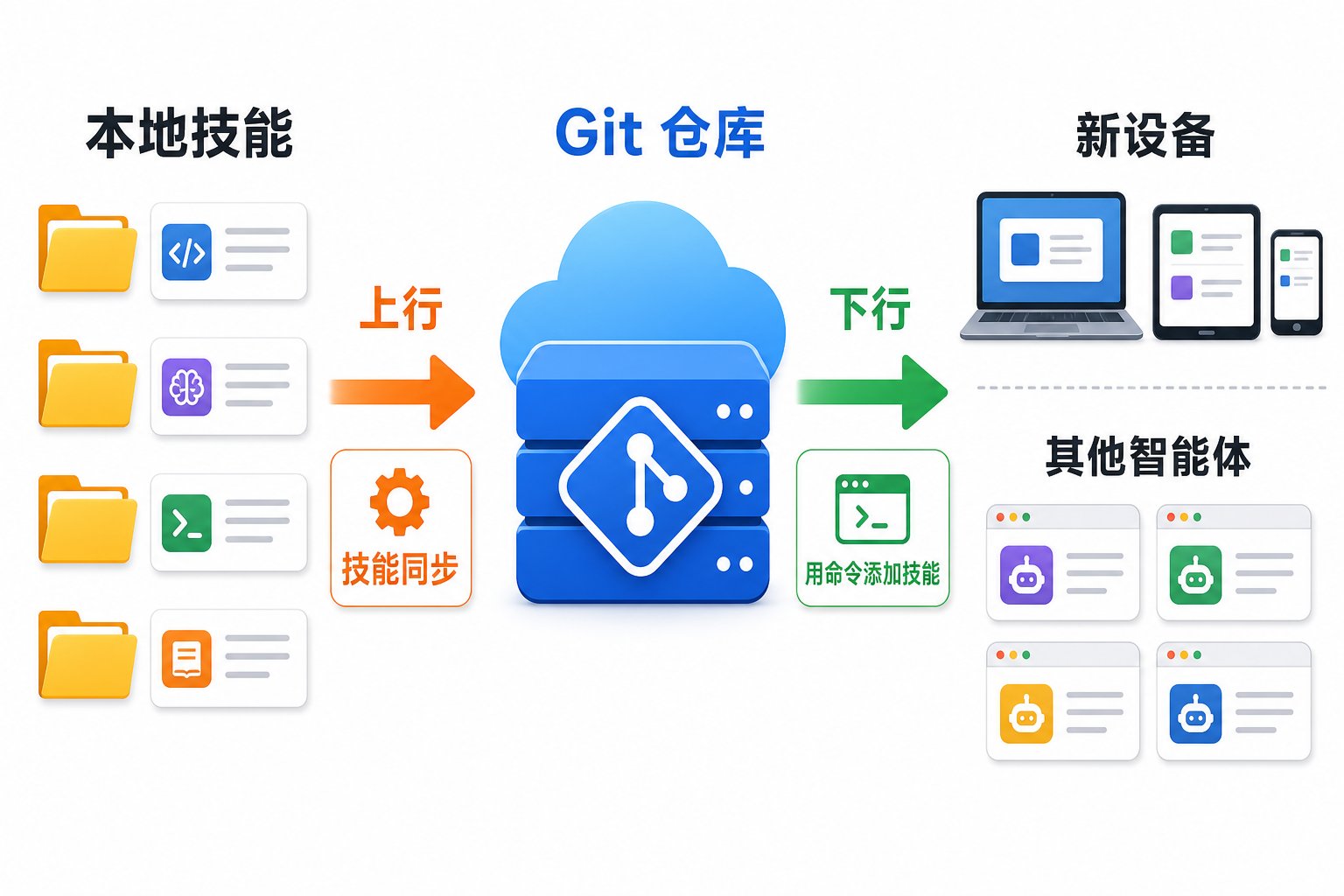
skills-sync for upload, npx skills add for download, and Git as the Skill repository in between.
The key here isn’t technical complexity—quite the opposite. The key is not over-engineering. Skills are fundamentally just a set of files. Git already solves version history, branching, rollback, permissions, and collaboration. Platforms like GitHub and GitLab already solve private repository access control. For individuals and small teams, if Git plus a local CLI already solves the problem, there’s no need to deploy a server from day one.
The division of labor is also clear. skills-sync handles upload: it scans the Skill directories of various local Agents, places your selected Skills into the target Git repository, and commits and pushes. npx skills add handles download: it reads Skills from the Git repository and installs them into the corresponding local Agent environment. For private repositories, I simply reuse local Git authentication, like SSH keys.
This gives Skills a fairly complete lifecycle:
- Created in a local Agent.
- Synced to Git via
skills-sync. - Gains version history in Git.
- Installed on other devices via
npx skills add. - Iterated further, synced again, updated again.
skills-sync Solves the Upload Problem
I wrote skills-sync because I noticed existing tools mostly solve “installing Skills.” But I also needed a tool in the opposite direction: collecting Skills I’d already written locally and pushing them to my own repository.
What it does today, roughly:
- Scans global and project-level Skill directories of mainstream Agents.
- Shows which Skills are currently detected.
- Compares versions against the target repository to determine whether each is new, identical, modified, or invalid.
- Supports interactive selection as well as non-interactive sync.
- Copies selected Skills into the canonical directory of the Git repository.
- Writes a sync manifest, and commits and pushes by default.
But I’d advise readers not to memorize specific commands here. A more Agent-era approach is to send the skills-sync repository URL directly to the Agent you’re using, and let it read the README itself.
For example, you could say:
This is the
skills-syncrepository:https://github.com/shiquda/skills-sync.Please read the README first to understand how it syncs local Agent Skills to a Git repository, install the accompanying Skill as instructed, then inspect my current environment and propose a sync plan.
This saves more attention than manually looking up flags. Because what truly needs human judgment isn’t how a flag is written—it’s which Skills to sync, which repository to sync to, and what shouldn’t be uploaded at all.
In my own local environment, skills-sync scan picks up Skills from multiple sources, like Codex, Claude Code, and general. The target repository is configured to my own Skill repo.
One detail I think matters: skills-sync doesn’t try to replace Git. It just puts Skills into a Git repository and lets Git keep doing what it’s good at. History, rollback, review, conflict handling—all of that stays with Git. That’s much lighter than building a whole new Skill platform.
Download Can Also Be Delegated to the Agent
For download, I didn’t reinvent the wheel. I use the mature npx skills add directly. It can add a Skill from a source, list Skills in a repository, install a specific Skill, target global or project-level installation, and specify the destination Agent.
But this part doesn’t require readers to memorize commands either.
A more natural approach is to tell the Agent:
This is my private Skill repository URL.
First, confirm whether this machine’s Git authentication can access it.
Then use
npx skills addto see what Skills are in there, and install the ones I specify to a location available to the current Agent. Explain what you’re about to do before executing.
For a team-private repository, as long as local Git authentication is configured, the Agent can access it via an SSH URL or other Git URL. That way, there’s no need to design a separate account system for skills-sync or the install flow.
This is also what I love about this setup: it doesn’t complicate things. skills-sync only handles uploading local assets to the repository; npx skills add only handles installing from the repository to local. Git handles versioning and permissions in between, and the Agent handles reading instructions, choosing commands, and executing the flow. Each layer stays restrained.
A Real Example: A Paper-Search Skill Flowing from Local Machine to VPS
Here’s an example from my own experience: I have a paper-search Skill that originally lived in Claude Code on my local machine. It’s not just “help me find some papers”—it encodes my search habits. Like which sources to prioritize, how to judge relevance, how to filter out low-quality material, and how to structure the final results.
Later, I wanted OpenClaw on my VPS to use the same Skill. The traditional approach would be manually locating the directory, copying files, transferring them to the VPS, and confirming OpenClaw’s Skill directory. It works, but it’s tedious—and every update means doing it all over again. Now it’s much simpler. I have local Claude Code upload the Skill to the Git repository following skills-sync‘s instructions. On the VPS, I give the repository URL to OpenClaw, let it read the README, and install via npx skills add.
Throughout the whole process, I don’t manually copy files or look up command flags myself. My role is more like conveying intent to the Agent, then letting the Agent complete the sync guided by the Skill’s instructions. This experience reinforced something for me: the value of a private Skill isn’t just plugin migration—it’s migrating your research methodology across devices and Agents.
Who Is This Approach For?
This approach isn’t for everyone. If you only use Agents occasionally and haven’t written your own Skills, you don’t need to worry about this yet—public Skills are enough.
It’s better suited for:
- People using multiple Agents simultaneously.
- People with multiple devices—local machine, laptop, VPS.
- People who’ve started writing their own Skills.
- People who want to codify workflows without maintaining a server.
- Small teams that want to share a common way of working with Agents.
Conversely, if you need complex backend permissions, auditing, approval flows, or want everything managed through a GUI, this approach might be too lightweight.
Its positioning is clear: a low-cost way for individuals and small teams to manage Skill assets. It’s not a full platform—it’s more like a connected pipeline.
The Essence of Skill Management Is Version Control for Personal Capability
Back to the original question: why bother managing private Skills carefully? My understanding is that a new type of asset is emerging in the Agent era: executable cognitive assets.
In the past, we managed code because code is an executable asset. Later, we managed documents because documents are knowledge assets. Now, Skills sit somewhere in between. They contain knowledge, and they also guide Agents to invoke tools and execute tasks. That makes Skills special.
A good private Skill might contain your writing style, research path, engineering habits, review standards, and team conventions. It’s not part of the model’s parameters, but it genuinely shapes Agent behavior. In other words, it’s a layer of knowledge increment you add on top of the base model.
The more stable and reusable that layer becomes, the more it deserves version control. Otherwise, it just scatters across conversations, directories, and machines, making long-term accumulation nearly impossible.
I increasingly believe that for many people, core assets in the future won’t just be code, articles, and notes—they’ll include a continuously evolving set of private Skills. They range from a single command to a full methodology. They exist as pluggable modules that can flow across models, Agents, and devices. That’s where their value lies.
Start with One Skill Repository
If you want to try this, I’d suggest not trying to organize all your Skills at once. Start with the three most-used categories: writing or content processing, research or search, and engineering or publishing.
Then create a private Git repository, give both the skills-sync repository URL and your target repository URL to the Agent, and have it read the README first before proposing an execution plan. On another device, give the target Skill repository URL to the Agent as well. Have it confirm Git authentication, read the repository structure, and install the specified Skills using the appropriate method.
Once that closed loop works, you already have a minimal viable private Skill management system. The point isn’t memorizing commands—it’s offloading the attention cost of “researching commands, checking environments, and executing syncs” to the Agent.
One boundary note: skills-sync is still primarily used by me personally. It’s a lightweight CLI that grew out of my own real workflow. So its use-case coverage is necessarily limited, and many issues will only surface when it runs in more people’s environments.
If you’re interested in this direction, you’re welcome to try it and give the repository a star. Issues and PRs are even more welcome—or just tell me about your use cases and problems. I’d genuinely appreciate it, because tools like this only reveal what’s truly useful versus what’s just my own habit when they run through more real-world scenarios.
And finally, back to that core point:
A Skill’s real value isn’t in how complex it looks—it’s in whether it can turn work that repeatedly drains your attention into a stable, reusable, portable capability.
References
skills-syncproject: https://github.com/shiquda/skills-sync- Vercel Labs
skillsCLI: https://github.com/vercel-labs/skills - Skills CLI documentation: https://www.skills.sh/docs/cli
- Vercel Agent Skills documentation: https://vercel.com/docs/agent-resources/skills