Enhancing Human-Agent Interaction with Slash Commands

“If you’ve done it three times, automate it.” That saying might be a bit exaggerated, but the thinking behind it is worth borrowing. When interacting with agents, you’ll often find certain needs recurring. If you standardize these needs and use short commands to reference lengthy prompt descriptions, you can help the agent understand your requirements clearly while reducing unnecessary cognitive load and operational steps on your end. The logic is simple: if something will require repeated effort in the future, then every efficiency improvement to that task is a meaningful gain in attention for each future execution.
This article shares some practical custom Slash Commands I’ve found useful. The prompts may not be the best written, but I hope the thinking behind them inspires you. Also, this article doesn’t cover the specific implementation format or technical details of writing them—the target audience should have ways to ask AI for help with that.
What is a Slash Command?
A Slash Command is a way to simplify user-system interaction. Users trigger predefined actions or functions by typing specific commands (usually starting with a slash). Readers who’ve used Coding Agents like Claude Code for development will be familiar with this.
Slash Command Ideas
Below are some custom Slash Commands I’ve distilled from practice that have proven useful to me. Again, this article doesn’t cover functional commands that simply wrap prompts for engineering tasks like one-click testing or committing—those are basic skills for any competent agent user, and you should consciously package frequently used prompts into Skills or Slash Commands. This article focuses on the characteristics of human-agent interaction, approaching from a higher dimension to design Slash Commands that enhance the overall agent interaction experience.
1️⃣ /notify - Task Completion Notification
I often have Coding Agents working in the background, but when they finish, I might not know about it—meaning the agent wasted that precious time doing nothing. As its boss, how could I want my employee to slack off? But if I keep staring at it working, that wastes my time too. Who’s the boss here, me or it? 😄
So I designed a /notify command that tells the agent to send me a Telegram notification when it completes the task. This way, I receive the notification on Telegram. Telegram notifications have high priority for me, so I’m likely to see them. After real-world testing, I’ve found that even after long tasks, the agent still remembers to do this. This effectively adds a hook to the agent’s task completion. You can modify the prompt to suit your needs. It looks something like this:
Note: This uses
appriseto send Telegram notifications. You can use other tools to implement notifications based on your needs.
1 | --- |
2️⃣ /learn - Learning from Conversations
If you’re not interested in the analysis of model “memory,” feel free to jump to the usage section.
Agents are different from humans. In some ways, human consciousness and memory management are tightly coupled. But agents are built on LLMs, which are inherently stateless—they have no memory capability. If there is any “memory,” it’s implemented through external files: essentially prompts stored on disk, organized by software, and ultimately fed to the LLM.
Fortunately, there are now many standardized memory management conventions. For example, Claude Code’s CLAUDE.md is passed in every conversation/tool call as global memory. OpenClaw’s MEMORY.md file provides a similar mechanism.
Another approach I find elegant is using skill. Since agent memory is essentially prompts, what advantages do skills offer from a memory perspective? I see at least two:
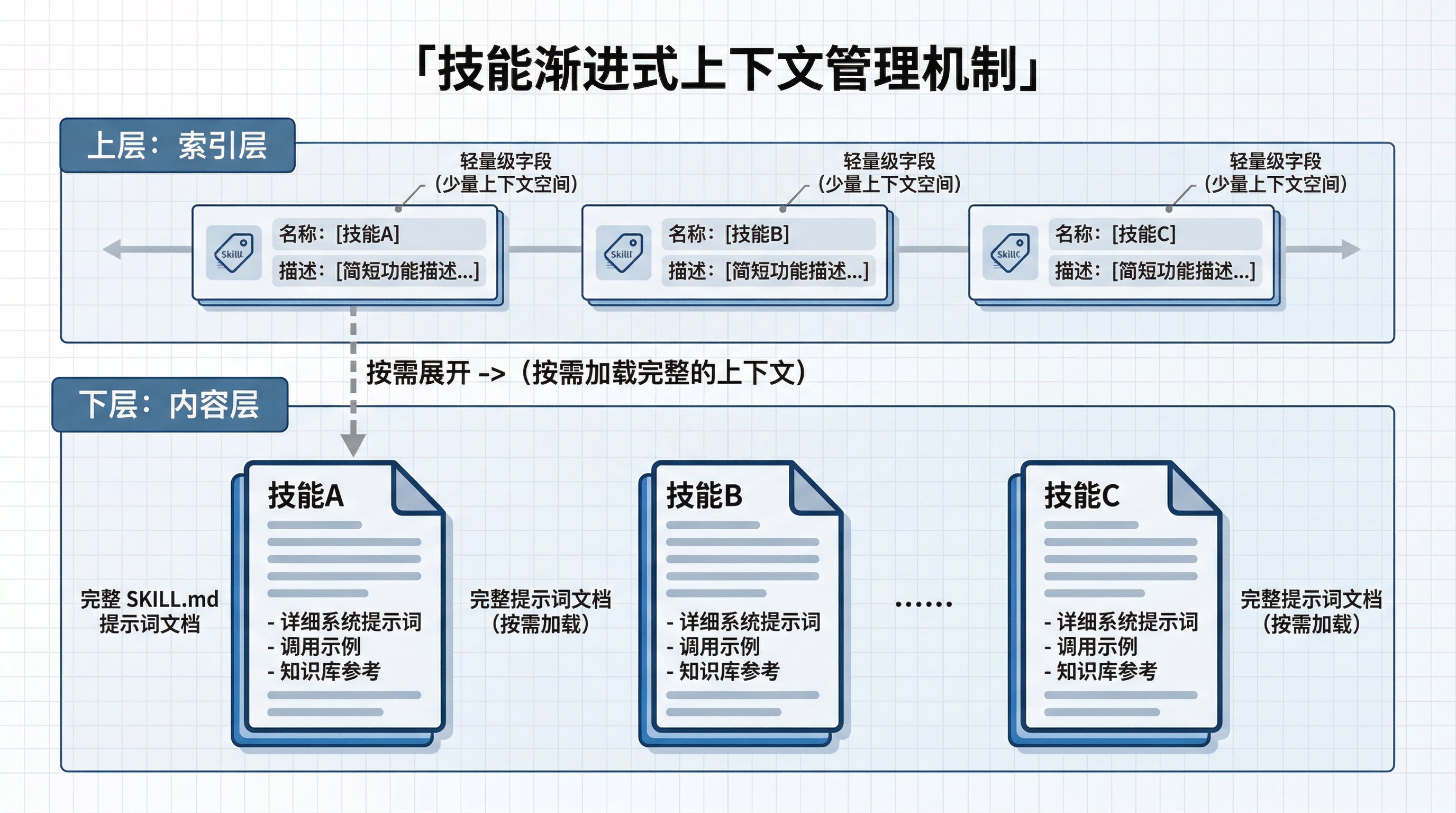
First, skill enables “progressive context management.” Context is precious in an agent’s context window. Skills that the agent calls on demand can occupy significant context space. This is essentially a trade-off between cost and efficiency when agents retrieve memory on demand. If full prompts were placed in a global memory file, they’d always be findable, but every call would consume substantial context space—not only costly but also affecting the agent’s reasoning quality. Humans struggle to multitask, and agents do too, to some extent.
Standard skills have custom YAML fields at the top of their SKILL.md, primarily name and description. During agent operation, these fields serve as an “index,” enabling “referencing” of large prompt content at a small context cost. When needed, the agent can invoke the skill by name to retrieve the full prompt content from its SKILL.md.
Going further, within SKILL.md, you can place less critical, on-demand content in a references directory for even more granular progressive context management.
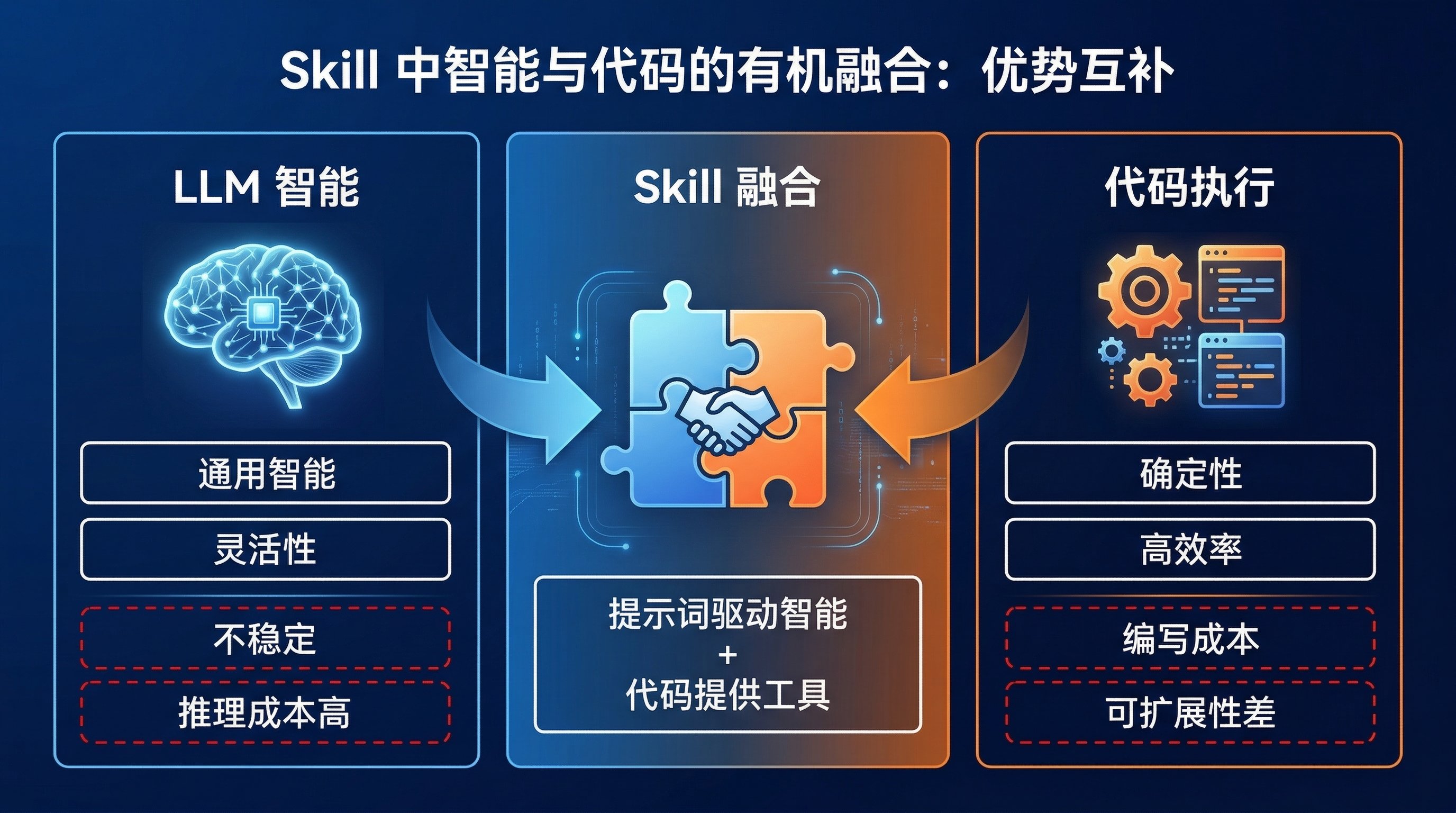
Second, skill achieves organic fusion of intelligence and code. LLMs and code are two tools with different strengths.
LLMs are trained on parts of human knowledge and possess a degree of general-purpose intelligence. With prompts and external tool environments, this intelligence can accomplish many things we humans once prided ourselves on—writing, translation, tool use, and more. But they also suffer from instability, especially when precise, structured output is required—LLMs can be unreliable. Additionally, using LLMs incurs reasoning costs; they’re inefficient for computationally heavy tasks.
Code, on the other hand, excels in determinism and efficiency. For tasks requiring precise, structured output or heavy computation, code is ideal. But code requires investment in writing, debugging, and maintenance, and it’s less extensible than prompts.
Skills combine the best of both. A skill can contain both prompts and code. The prompt portion drives intelligence, guiding the agent on how to use the skill; the code portion serves as a tool for the agent, compensating for LLM inefficiencies and unreliability. From a memory perspective, programmatizing certain functions into skill code can significantly save the agent’s memory space.
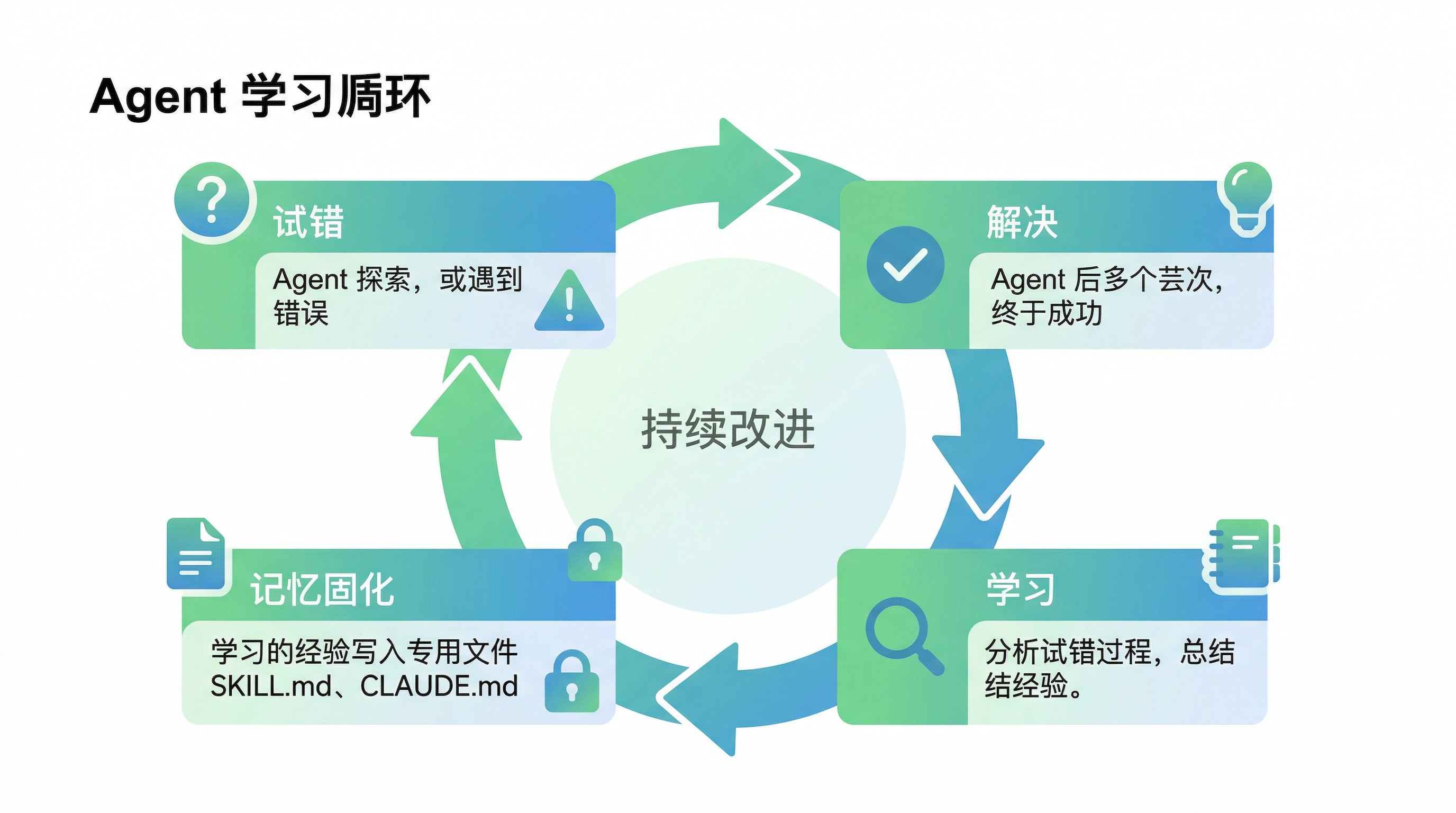
When using agents with persistent memory like OpenClaw, or other Coding Agents to assist with standardized workflows like development or writing, you might notice that agents often make mistakes in tool calls or misunderstand instructions, requiring repeated human confirmation. But these issues can be resolved through trial and error. When the agent finally solves a problem after repeated attempts, the context contains its complete trial-and-error process—a perfect learning opportunity for the agent.
Usage:
So I designed a /learn command that asks the agent to summarize what it learned during a task. Good times to use it: after the agent solves a problem through multiple attempts, or during idle periods (like early morning) to summarize the day’s lessons. This command is simple—it doesn’t even need complex prompt techniques:
1 |
|
If you have your own memory file system, you can adjust the command accordingly. If you’re using a long-running autonomous agent like OpenClaw, you could even design this as a scheduled task, having the agent summarize the day’s experiences during idle hours (like 4 AM).
3️⃣ /align - Aligning Human and Agent Requirements
When using agents, you’ll often find that their understanding of your requirements isn’t entirely accurate. In most cases, it’s because within the limited context of your conversation, you didn’t realize that some critical information for completing the task wasn’t conveyed. If you catch this early, you can correct course and supplement information to help the agent understand better. But if you don’t, the agent may proceed with its own interpretation, wasting valuable time and tokens.
There’s a technical reason behind this: during RLHF training, human annotators typically prefer “complete, fluent answers” over “admitting uncertainty,” which causes models to push through tasks when uncertain rather than proactively clarifying understanding. In practice, though, we’d prefer models to ask questions when understanding is unclear, rather than executing on potentially wrong interpretations.
As users, we can’t easily influence model training. What we should consider is: among the things we can control, how can we better solve this problem? The answer is aligning requirements before starting work. Specifically, writing detailed prompts is a good habit. But I think an even better approach is to have the agent proactively ask questions before starting, to confirm its understanding of the task and surface any blind spots in the human’s thinking. This way, we can align requirements relatively easily by answering questions, and we also get visibility into aspects we hadn’t thought to communicate—deepening our understanding of prompt design.
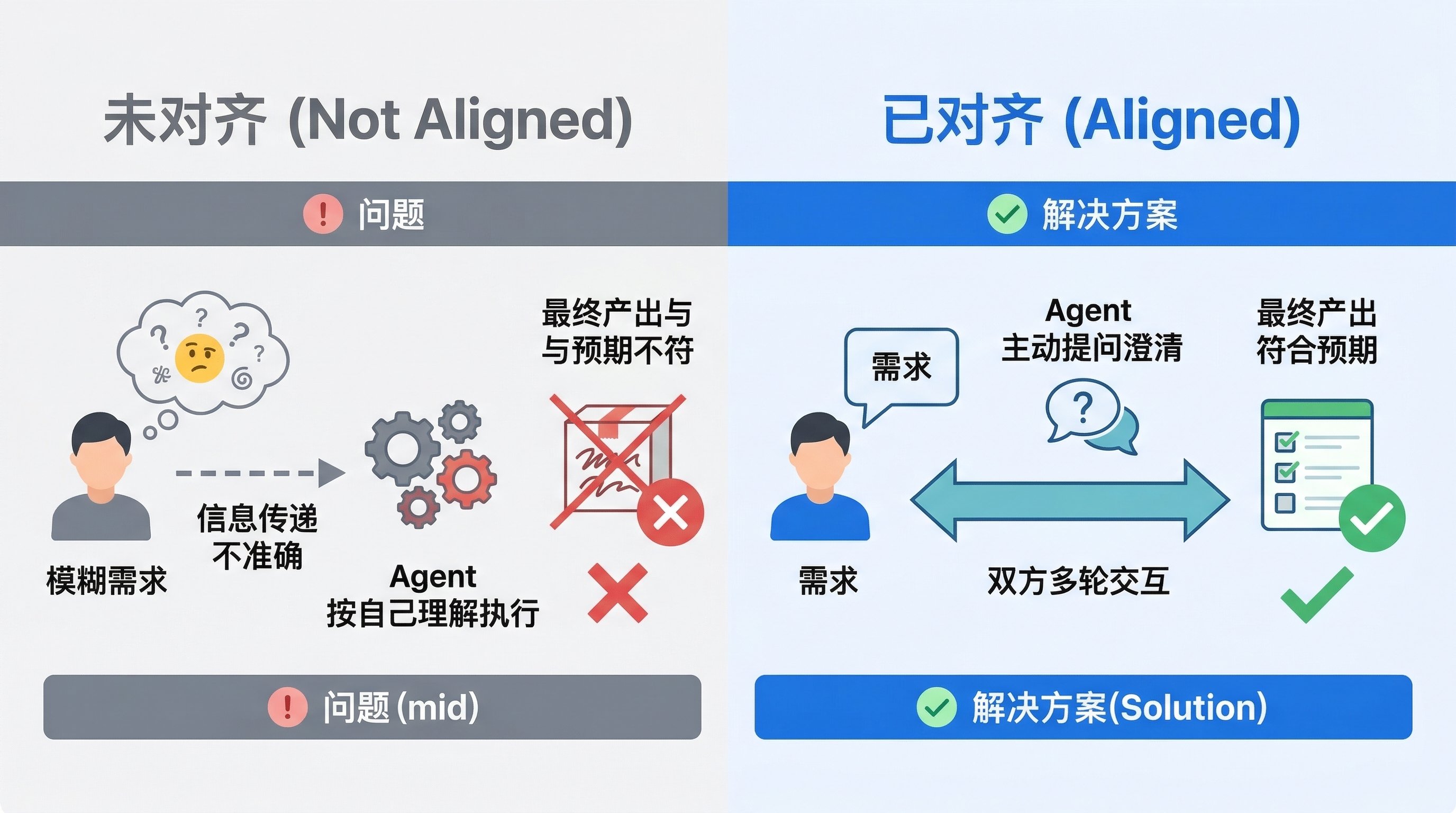
So I designed an /align command that asks the agent to summarize its understanding of a task and align it with my requirements before starting. When used, the agent proactively asks 2-3 clarifying questions, progressively confirming its understanding until both sides are fully aligned before execution. This command is also simple:
1 | --- |
Going forward, when assigning requirement-based tasks to agents, consider starting with this command to align requirements first. While it may add some upfront communication cost, from an expected-value perspective, it should save potential time, energy, and money in the downstream development process.
Summary
These three commands address three core issues: notification, memory iteration, and requirement alignment. Use /align to align upfront and reduce rework; use /learn to leverage valuable trial-and-error experiences for the agent; use /notify to reduce mental overhead and save time, improving parallel efficiency.
This article is meant to spark ideas. If even one command or thought here inspires you, its purpose is fulfilled. I’d love to hear from readers: what other interesting Slash Commands have you found that improve the “happiness” of interacting with agents? Feel free to share in the comments!