Rethinking Agents and the Essence of Productivity
About Agents
Let’s start by revisiting what an Agent is.
An Agent can generally be viewed as an intelligent entity capable of autonomously completing tasks: it can make decisions based on environmental changes, and learn and adapt to new situations within a certain scope.
Agents are powered by LLMs, which are trained on the “symbols” humans have generated—such as text and images—using deep learning algorithms and natural language processing techniques, and then generate the desired text through reasoning. This means an Agent’s inherent capabilities are largely determined by the LLM’s capabilities, which in turn can be seen as “a (partial) fitting of existing human knowledge.” Therefore, Agents do possess a certain degree of “intelligence” (note: distinct from “consciousness”). This intelligence can substantially relieve humans of cognitive load and attention overhead, and those who are adept at leveraging Agents can redirect their precious attention toward more valuable tasks.
The Core Idea Behind Productivity Gains
Building on the concept of Agents above, let’s analyze the core strategies for using Agents to boost productivity through the lens of “attention liberation.” Below are some thoughts I’ve compiled for your reference:
1️⃣ Standardize Recurring Expression Needs in Interactions
I remember reading a quote from an expert online, roughly saying:
If there’s something you find yourself reusing in prompts more than three times, turn it into a command.
When interacting with Agents, you’ll often notice certain needs recurring. For example, in Coding Agents, one frequent task is compact—compressing the conversation context. While this happens automatically when approaching the context limit, there are also times when you need to manually compress the context. Coding Agents like Claude Code and OpenCode have standardized this need through a simple alias like /compact as a slash command, significantly reducing the cognitive load and operational steps required each time you need to perform this task.
Imagine having to type out a lengthy explanation to the Agent every time you had this need—it would be not only tedious but also add to your attention burden.
You might argue that typing “compress context” could achieve a similar effect. But there’s often a cognitive misalignment between humans and Agents during interaction. Your specific needs may not be clearly understood by the Agent through just a few simple words—this is essentially a trade-off between the detail of the requirements provided and the quality of execution.
Standardization optimizes this trade-off: by standardizing recurring scenario needs, we can reference lengthy prompt descriptions with short commands. This allows the Agent to clearly understand our requirements while reducing our own cognitive load and operational steps during expression. This approach is both ideal and the easiest to implement.
2️⃣ Build an Autonomous Plan-Execute-Feedback Loop
A key difference between Agents and pure conversational LLMs is that Agents can autonomously use provided tools to interact with the environment based on a given goal, and make subsequent decisions based on tool execution feedback—thereby achieving an autonomous plan-execute-feedback loop (for the distinction between agent and workflow, see Anthropic: Building effective agents).
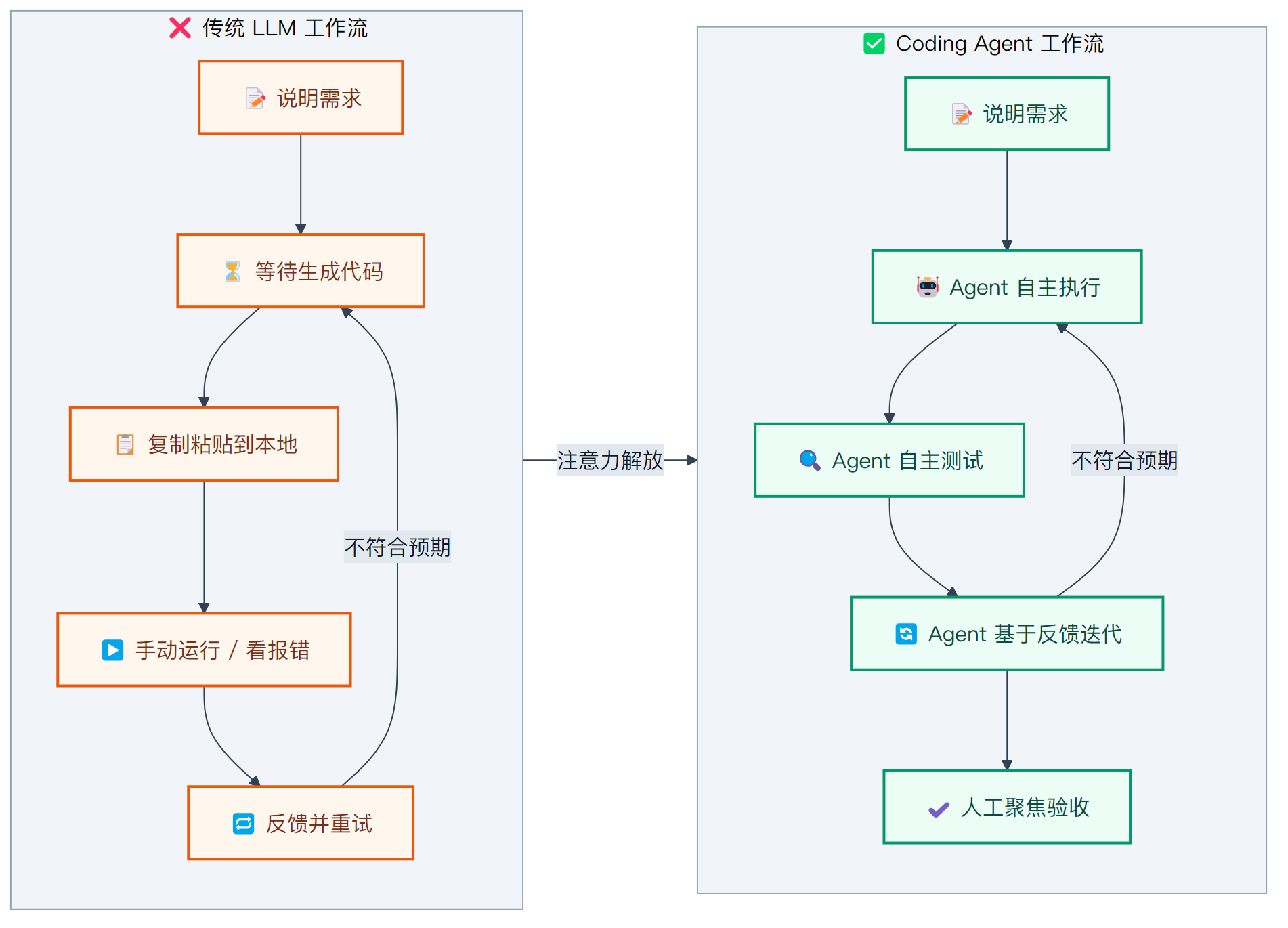
Here’s an example from around 2023, based on my personal experience: I needed to write a script. I described the requirements to an LLM in a web-based chat, and it wrote the script. I copied and pasted it into VS Code, ran it, hit an error, pasted the error back to the web-based LLM, and it suggested possible solutions. I manually fixed it or copied the full corrected code and tried again—repeating this cycle until the script ran successfully and met my expectations.
Looking back at this example, where was human attention being allocated?
- Telling the LLM my requirements
- Waiting for the LLM to generate the script
- Copying and pasting the script into VS Code
- Clicking run
- Waiting for the result, checking for errors or whether it met requirements
- If not, feeding the feedback back to the LLM. Back to step 2.
- Done
Now, when using a Coding Agent, where is human attention allocated?
- Telling the Agent my requirements
- Agent generates the script
- Autonomously tests and checks for errors
- Attempts a simple run to preliminarily verify it meets requirements
- Waiting for the Agent to complete the above. If not done, continue observing and waiting
- Evaluating whether the Agent’s output meets expectations. If not, providing feedback and returning to step 1.
As you can see, the Agent’s autonomous plan-execute-feedback loop dramatically reduces human attention consumption in the intermediate steps, allowing us to focus more attention on core requirement articulation and acceptance testing, rather than being consumed by mechanical, repetitive operations and waiting time. These tasks may seem simple, but they still demand a share of attention. If your attention is spread across such tedious work, your daily attention budget quickly dwindles.
Compared to plain LLMs, using a Coding Agent essentially adds execution and feedback capabilities. The traditional copy-paste approach only leverages the LLM’s planning and code-writing abilities, while actual code execution and feedback handling fall on us. The execution and feedback links in the chain remain disconnected, preventing a closed loop.
Over the past year, the Agent ecosystem has matured considerably, with development experiences becoming quite polished. Many stages have now formed closed loops, delivering qualitative efficiency gains. However, in other domains—and even within coding itself—many areas still need improvement. We can work together with Agents to close the entire plan-execute-feedback loop, making the process more automated and conserving our valuable attention.
For example, in writing, there are recurring needs that can be automated. Producing a formal article typically involves these stages:
- Topic selection
- Outline planning
- Drafting
- Polishing (formatting, correcting typos and grammar)
- Adding illustrations
- Publishing
- Monitoring article metrics
This is just a simple outline; everyone’s workflow differs. But regardless, you’ll likely find some stages are mechanical and repetitive—such as polishing, illustrating, publishing, and metrics monitoring. These are ideal candidates for Agent automation. By connecting the right tools, we can let Agents handle these stages, freeing our attention for the more creative and thoughtful work: topic selection, outline planning, and drafting.
One thing I’ve been exploring recently is using a Coding Agent to build a dedicated repository for article writing, distilling repetitive actions into “reusable commands + reusable scripts.” In other words, my goal isn’t to have the Agent “write my opinions” but to reliably handle the process-driven stages.
I initially used OpenCode and later migrated to Claude Code. My reasons for choosing Claude Code: its built-in permission checks and change preview mechanisms suit scenarios where I need to review changes myself; its VS Code integration is excellent—I can select a paragraph in the editor and have Claude Code revise it, completing about 90% of operations without leaving VS Code.
That said, which Coding Agent you choose doesn’t matter—what matters is the approach to handling daily workflows. This mindset extends beyond writing to any domain: for intellectual tasks that require long-term repetition, if you can automate them with Agents, the more you use them, the more attention you save, and the compounding effect becomes increasingly evident.
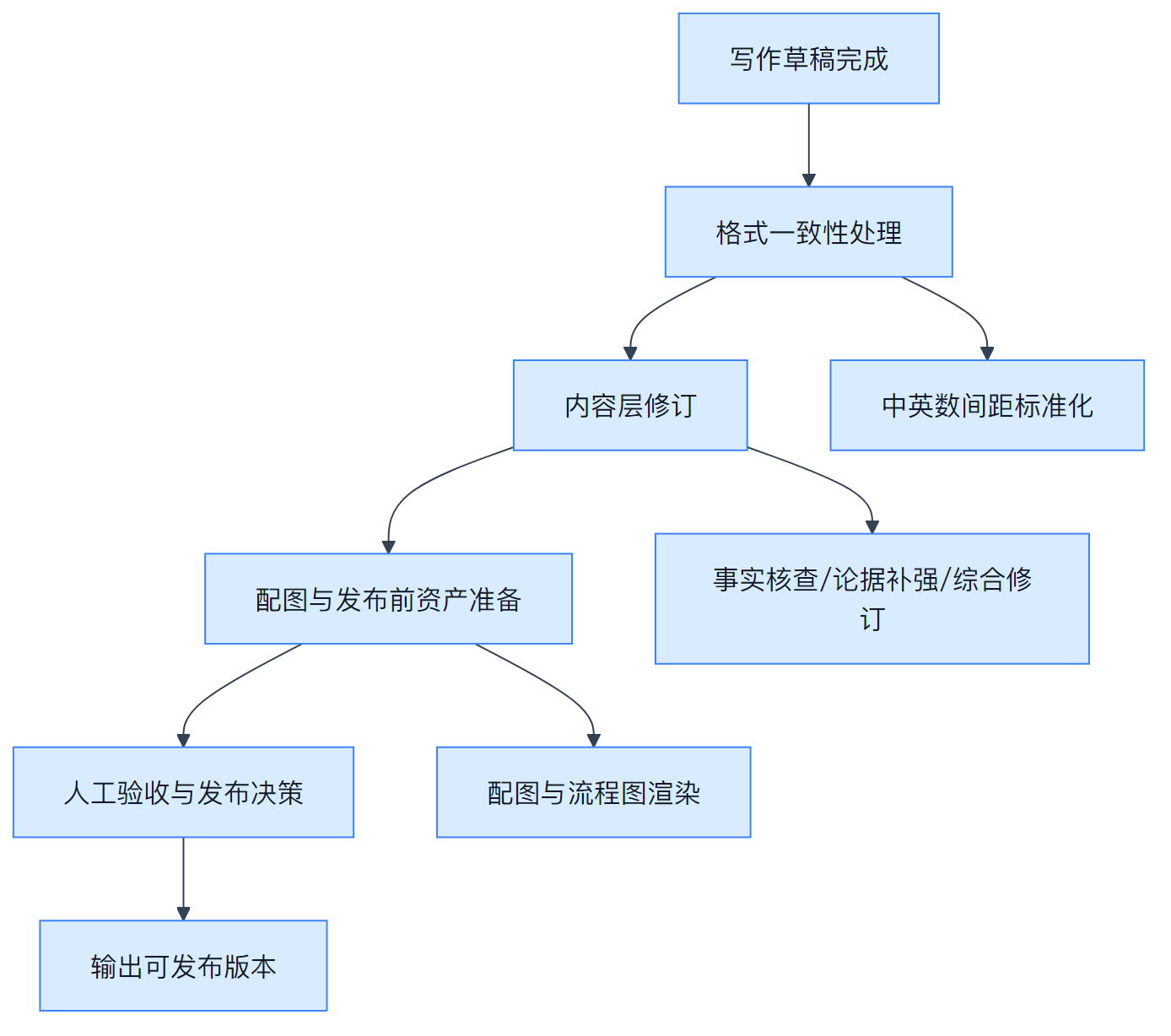
Here’s a writing productivity workflow I’m currently exploring, presented by OpenCode:
Before diving into the steps, let me clarify the “entry points and boundaries” of this OpenCode pipeline:
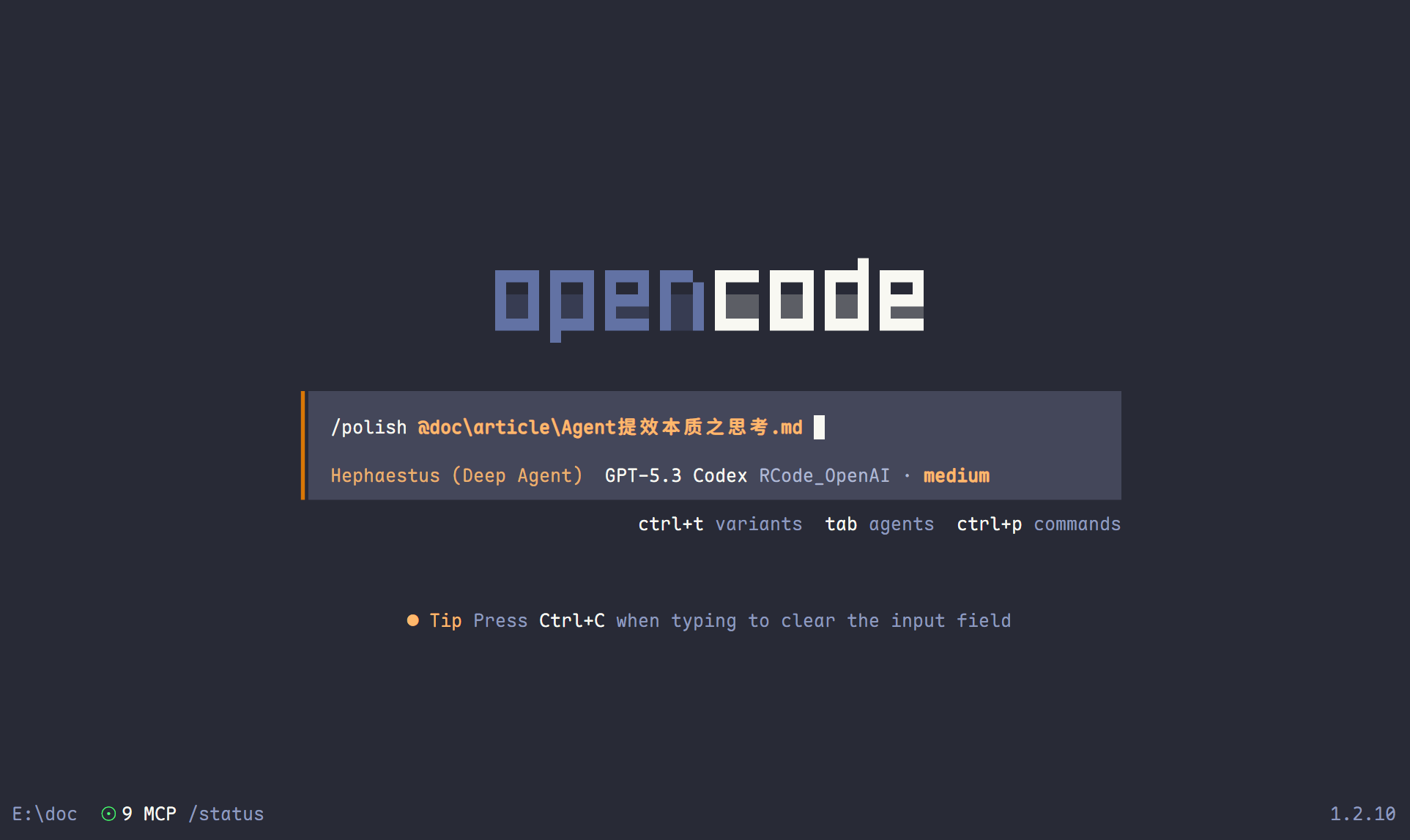
- Two entry points: first, run
/polish @doc/article/xxx.mdto complete “formatting → fact-checking → Markdown enhancement → (optional) illustration,” then run/publish @doc/article/xxx.mdto generate the publishable version and replace local images with CDN links.- Granular capabilities are handled by atomic skills:
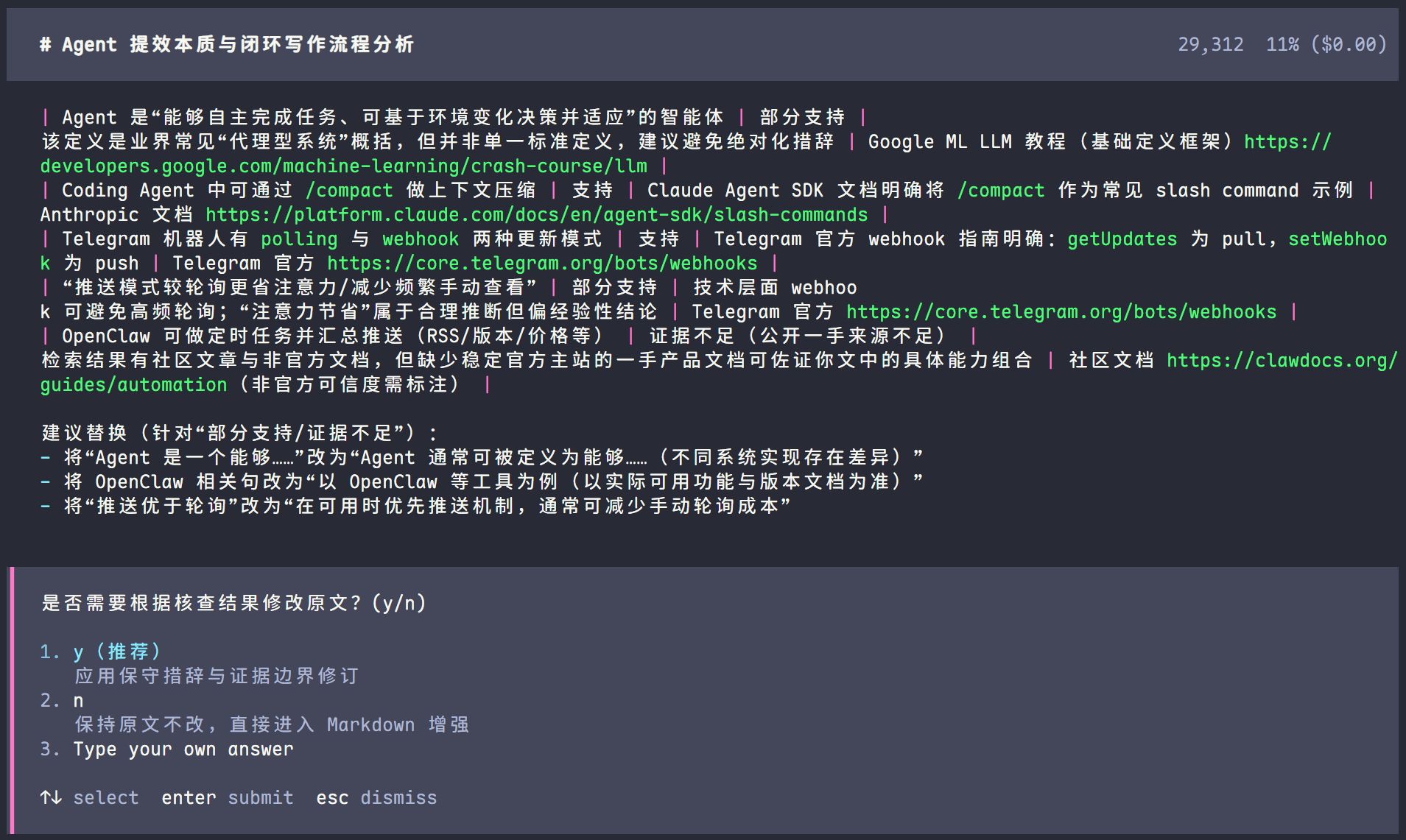
formatonly handles Chinese-English-number spacing,fact-checkextracts verifiable claims and provides sources and rewrite suggestions,markdown-enhanceadds lightweight annotation enhancements, andillustrategenerates illustration assets.- Scripts and Agents have clear divisions of labor: Python scripts in
tools/handle stable execution (formatting, rendering, uploading, etc.) without semantic judgment; semantic decisions and trade-offs are made jointly by the Agent and human acceptance.- Prioritize “parallel, non-blocking checks” in execution: tasks like format checks, link verification, and asset preparation that don’t block the main line should run in the background in parallel, with results aggregated at the end, avoiding the main thread being occupied by low-value waiting.
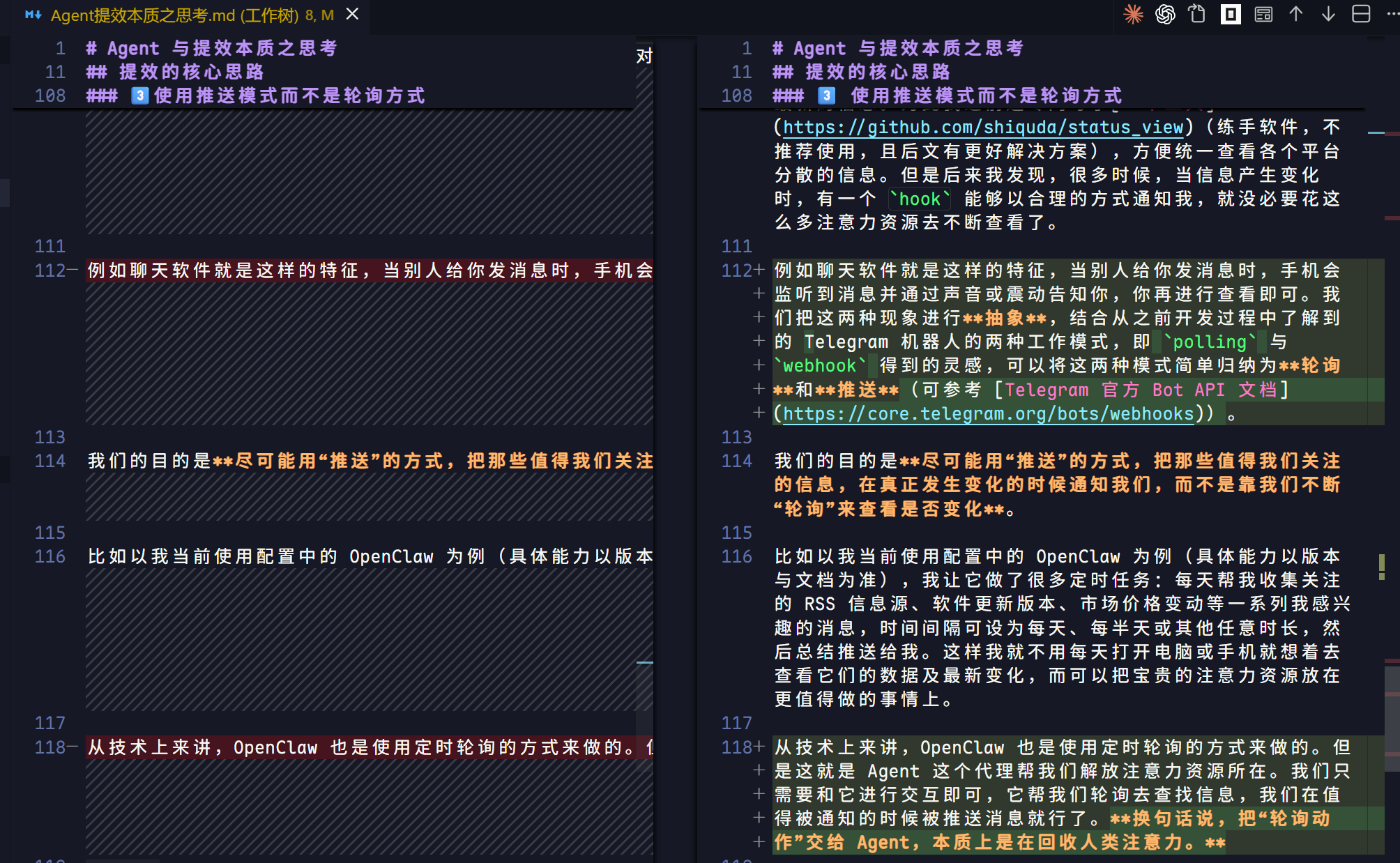
The three screenshots below correspond to three key touchpoints in this workflow: “orchestration entry, fact-check rewrite suggestions, and workspace diff acceptance”:
1 Start with format consistency (noise reduction)
- Use
python tools/quick_format.py <draft.md>to standardize Chinese-English-number spacing in the draft.- If I only want to preview the diff without overwriting, run
python tools/quick_format_check.py <draft.md>to generate a preview version.- The value here is straightforward: clear out low-value but high-frequency formatting tasks first, so I’m not interrupted by formatting noise during subsequent revisions.
2 Then do content-level revisions (facts, arguments, expression)
- Use
/fact-checkfor fact verification, focusing on dates, data, and source chains.- Use
/strengthento reinforce arguments—adding evidence, counterexamples, or boundary conditions.- Use
/revisefor comprehensive revisions, unifying tone, target audience, and length constraints.- Essentially, this standardizes “revision requirements I repeatedly explain verbally” into slash commands, reducing communication friction.
3 Do a lightweight annotation enhancement (without changing meaning)
- Use
markdown-enhanceto review the article, adding backticks to technical terms, commands, and paths.- Bold key judgment sentences appropriately; if truly necessary, add 1-3 external reference links.
- The principle is “less is more”: don’t change sentence structure, viewpoints, or conclusions unless necessary.
4 Finally, prepare illustrations and pre-publish assets
- The illustration pipeline uses
skill("illustrate")andtools/illustrate.py, with keys uniformly read from.env.- If the article contains flowcharts, use
tools/mermaid_render.pyto output high-resolution images, avoiding inconsistent resolution from manual screenshots.- At this point, I can essentially redirect my attention back to the three core questions: “Is the information accurate? Does the argument hold? Is the structure clear?”
One boundary to emphasize: scripts in
tools/only handle formatting and asset processing—they don’t make content judgments; content judgment remains with the Agent’s retrieval and reasoning pipeline. In other words, scripts handle stable execution, the Agent handles semantic decisions, and humans handle final acceptance.So what this approach truly solves isn’t “saving a few minutes of operations”—it’s extracting attention from mechanical steps and continuously investing it in high-value stages like topic selection, argumentation, and expression. Once this loop runs smoothly, writing productivity becomes sustainable.
Of course, this workflow is just my initial exploration and will continue to evolve—for example, adding auto-publishing to various platforms (personal blog, forums, Telegram groups, Xiaohongshu, X, etc.).
Similar challenges exist in other domains. By analyzing and iterating on these workflows through the lens of closing the three plan-execute-feedback loops, I believe we can save a significant amount of precious attention.
3️⃣ Use Push Instead of Polling
In daily life, I experience what I’d call “information anxiety.” For topics I care about, I find myself constantly refreshing to be the first to get the latest updates. I even wrote a tool for this (a practice project—not recommended, and there’s a better solution below) to aggregate scattered information from various platforms in one place. But I later realized that when information changes, if there’s a hook that can notify me in a reasonable way, there’s no need to spend so much attention constantly checking.
Messaging apps are a good example: when someone sends you a message, your phone detects it and alerts you via sound or vibration—you just check when notified. If we abstract these two phenomena, drawing inspiration from the two working modes of Telegram bots I encountered during development—polling and webhook—we can categorize them simply as polling and push (see the Telegram Bot API documentation).
Our goal is to use “push” as much as possible, so that information worth our attention notifies us when it actually changes, rather than relying on us to constantly “poll” for changes.
Take OpenClaw in my current setup as an example (specific capabilities depend on version and documentation). I’ve configured it with various scheduled tasks: daily collection of RSS feeds I follow, software version updates, market price changes, and other topics of interest—at intervals of daily, twice daily, or any other duration—then summarized and pushed to me. This way, I don’t need to open my computer or phone and think about checking their data and latest changes; I can devote my precious attention to more worthwhile endeavors.
Technically, OpenClaw uses scheduled polling under the hood. But that’s precisely where the Agent liberates our attention. We just interact with it—it handles the polling and searching, and we get pushed notifications when something warrants our attention. In other words, delegating the “polling action” to an Agent is fundamentally reclaiming human attention.
Conclusion
In an era of accelerating pace and increasingly fragmented information, Agents offer us an incredibly valuable tool—one that helps liberate our attention and allows us to focus on what truly matters. A person’s attention is one of their most precious resources. Those who learn to harness Agents effectively will be better equipped to thrive in this age.
This article was created with the assistance of my
doc agent, Powered by OpenCode. Some images were AI-generated.