🌳 Treex - Advanced Command-line Directory Tree Visualization Tool
Today I’d like to recommend a small tool I recently developed for developers — Treex.
🤔 Why do you need this tool?
During development and learning, you may have encountered scenarios like:
- For an unfamiliar project, looking at the complex project structure, not knowing where to start
- Wanting to quickly show a large model your project structure so it can help you understand
- Needing to insert a visual directory structure when writing project documentation
The traditional tree command works, but its features are too basic. While using it, I often found that it would draw out files I didn’t need (for example, node_modules in Node projects), resulting in too much unnecessary information and making things look messier.
So I used Cursor and developed Treex in Go. It’s a directory tree tool that supports multiple output formats and filtering.
Project URL: https://github.com/shiquda/treex
✨ Core Features at a Glance
🎨 Multiple Output Formats
- 🌲 Tree format (default): classic command-line tree structure
- 📑 Indent format: clean hierarchical indentation
- 📝 Markdown format: paste directly into documents
- 📊 Mermaid format: generate embeddable flowcharts
🔍 Smart Filtering
- 🕵️ Hide hidden files like
.git - 📁 Show only directory structure
- 🚫 Exclude specified directories/file types
🛠️ Highly Customizable
- 📏 Control directory depth
- 💾 Output to file
- 🎯 Custom display formats
🚀 Quick Start
Download
Method 1: Download precompiled binaries
Download from the Release page, then add to PATH
Method 2: Install with Go
If you have a Go environment, you can install with one command:
1 | go install github.com/shiquda/treex@latest |
Basic Usage
1 | # View current directory structure |
Output:
1 | └── . |
⚡ Advanced Usage Examples
1. Generate project documentation
1 | # Exclude hidden files, output Markdown format to specified file |
- ./
- 1.go
- 2.go
- README.md
- build/
- win/
- output.exe
- win/
- test/
- 3.go
- README_test.md
2. Tech talk illustrations
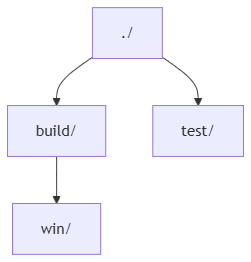
1 | # Keep only non-hidden directories, generate Mermaid code |
1 | graph TD |
3. Exclude specific files
1 | # Exclude unimportant directories and file types |
1 | └── . |
🛠️ Full Parameter Reference
You can check https://github.com/shiquda/treex for details.
| Parameter | Description |
|---|---|
-d |
Directory to scan (default: current directory) |
-f |
Output format (tree/indent/md/mermaid) |
-m |
Maximum directory depth (0 means unlimited) |
-o |
Output file path |
-e |
Exclusion rules (comma-separated) |
-H |
Hide hidden files |
-D |
Show directories only |
💖 Looking Forward to Your Participation
Treex is still in early development. I don’t have much development experience, and limited by my personal skill level, the tool inevitably has shortcomings. If you:
- Found a bug
- Have feature suggestions
- Want to contribute code
Feel free to submit an Issue or PR on GitHub! Of course, a ⭐ star of encouragement would also be great~
Project URL: https://github.com/shiquda/treex