The most magical thing about Git, in my opinion, is that it lets different members of the same project write their own code without interfering with each other. However, when it comes time to merge everyone’s work together, things get a bit tricky.
To accomplish this, there are two approaches: git merge and git rebase. What are these two methods, and which one should you use?
Let’s walk through a concrete example:
First, imagine we’ve already developed two tasks for feature 1:

Then my team needs to complete feature 2. We’ve finished part of feature 2, but suddenly another team discovers an important bug in feature 1 and fixes it — and that fix affects our feature 2 work. So the situation becomes:

Before we continue developing feature 2, we have to integrate the main team’s bug fix. There are two ways to do this:
Method 1: git merge main

This merges the bug fix from the main branch into our feature2 branch, creating an extra commit on our branch: Merge branch 'main' into feature2.
We continue developing, finish feature 2, and eventually merge this branch back into main.
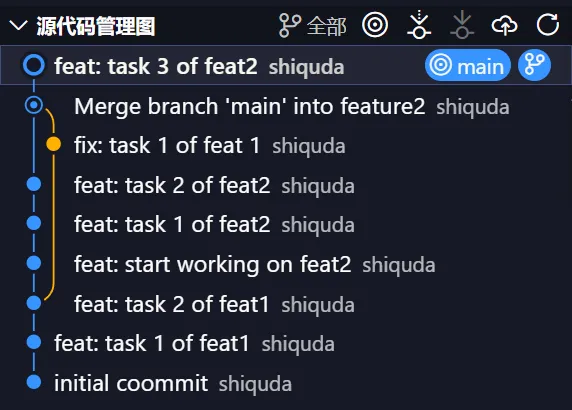
At this point, the feature2 branch and the main branch are completely identical. Notice that the bug fix commit from main was added to feature2 via a merge commit — the merge commit is essentially the junction point where the two branches converge. The advantage is that all details are preserved, but the downside is that extra merge commits appear in the main branch.
Method 2: git rebase main
Let’s go back to that same point. Again, we need to sync the main branch changes into our feature2 branch before continuing development.
We run git rebase main on the feature2 branch:

The essence of rebase is rewriting history — it “transplants” the changes from the feature2 branch onto the updated main branch. This changes the commit timestamps of task1 and task2 on our branch.
Continue and complete task3:

Then merge it into main:

After running git merge feature2, you’ll notice the commit history is a straight line. This is because after rebasing, the history is already linearized, so merging into main triggers a fast-forward merge and no extra merge commit is created.

How should you choose between merge and rebase?
The table below summarizes the comparison between merge and rebase:
| Aspect | Git Merge | Git Rebase |
|---|---|---|
| Commit structure | Produces extra merge commits | No merge commits, linear history |
| History | Preserves full history, including branch structure | Creates a linear, clean history |
| Best for | All collaborative scenarios, especially public branches | Mainly unpushed local branches |
| Safety | High — does not change existing commits | Moderate — rewrites commit history |
| Conflict handling | Resolves all conflicts at once | May require resolving conflicts commit by commit |
| Code review | Can be harder to trace specific changes | Easier to review changes commit by commit |
| Recommendation | Public branches with multiple collaborators | Personal branches or team-internal conventions |
Merge does produce merge commits and makes history more complex, but it preserves the complete branch structure, which helps with code review and issue tracking.
Rebase, on the other hand, linearizes history and makes it easier to manage, but it rewrites commit history, which can confuse others who based their work on the original history.
If multiple people are working on your branch, rebasing and force-pushing to the repository is a very bad idea. Because rebase rewrites the history of that branch, it can mislead everyone else who built their work on the original history.
The golden rule of rebase is: Only use Rebase on local branches that have not been pushed. In other words, if a branch has already been pushed to the remote and might be used by others, you should not rebase and force-push it.
| Operation | Safe boundary | Risky boundary |
|---|---|---|
git rebase + unpushed |
Completely safe | None |
git rebase + force push |
Only personal branches or with team consensus | Public branches, shared branches |
git merge |
All collaborative scenarios (but creates merge commits) | None (unless the project forbids merge commits) |