Why can’t I load images from Imgur?
In short, the IP is blacklisted. Imgur is inaccessible from mainland China, so we need to use a proxy/VPN to access it. The problem is that your proxy node’s IP might be on Imgur’s blacklist, which prevents images from loading. Specifically, visiting i.imgur.com (the direct image link) returns 429, while visiting imgur.com returns
1 | { |
So what can we do?
The simplest solution is actually to switch to a different node.
However, I found that after trying all my existing nodes (including self-hosted ones), none of them could access Imgur properly!
Some netizens said that many datacenter IPs have been blacklisted by Imgur. Coincidentally, I didn’t feel like hunting for more nodes either, so I decided to tinker and come up with a workaround.
Idea 1
Many websites are slow or blocked in mainland China, so some people create public mirror sites, like HF-Mirror for Hugging Face.
So I wondered: is there an Imgur mirror site?
Answer: I couldn’t find one.
However, there are sites that provide image mirror/caching services. They can cache direct links from image hosts and relay them to users. For details, see this article.
Take https://img.noobzone.ru/getimg.php?url= as an example: just append the Imgur image URL you want to access to the end of this URL (pass it as a parameter), and you can access it without a proxy/VPN.
For example: https://img.noobzone.ru/getimg.php?url=https://i.imgur.com/TbWS0cZ.png
Idea 2
I thought of Header Editor (google.com), a browser extension that can redirect any request matching certain conditions.
So I wrote a regex to match URLs whose domain is i.imgur.com and redirect them to https://img.noobzone.ru/getimg.php?url=.
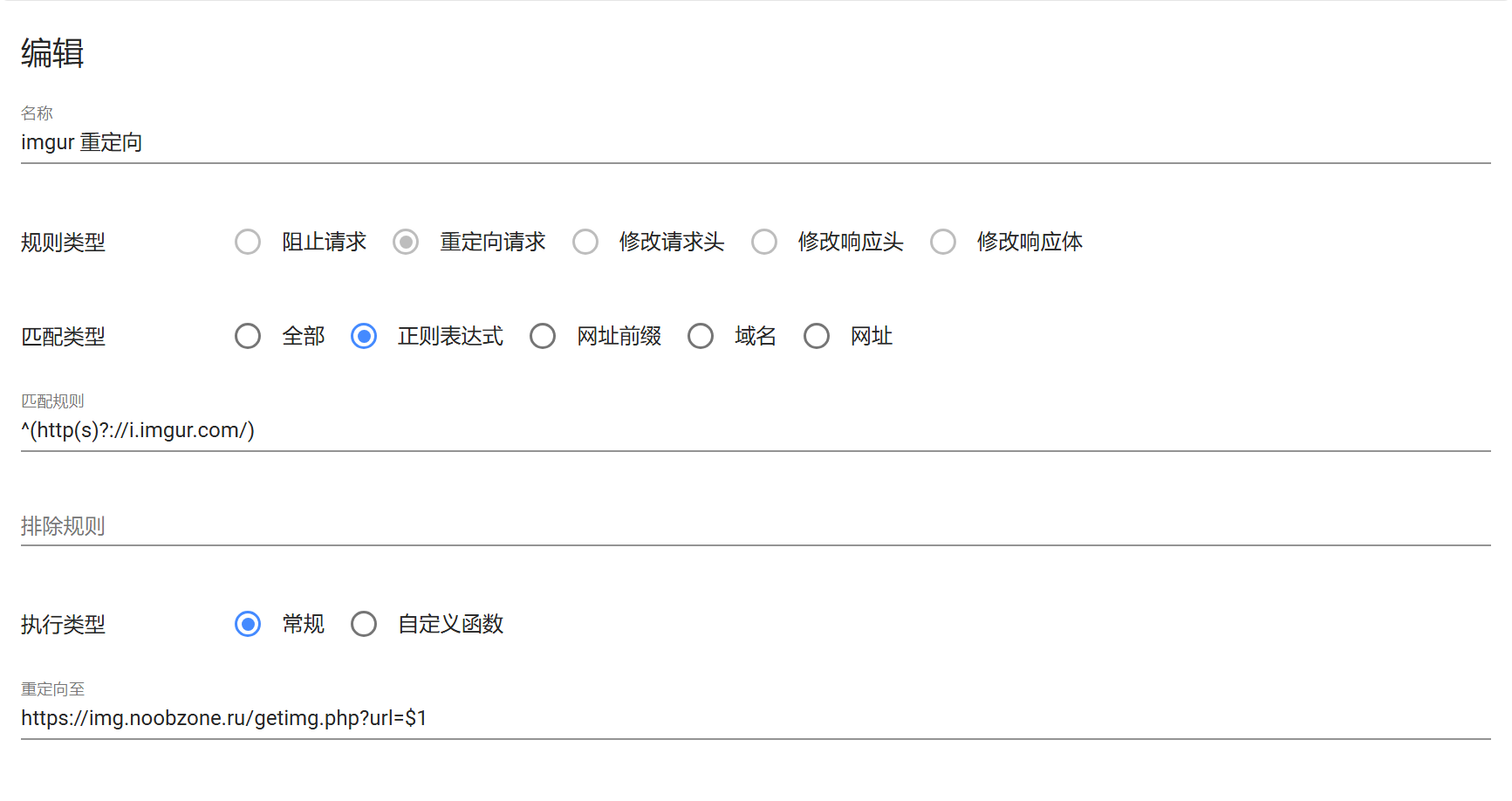
Update: Thanks to a helpful reader’s reminder, I found that this image caching site seems to have enabled hotlink protection. We can create another rule to strip the referer from request headers, and images will load normally again.
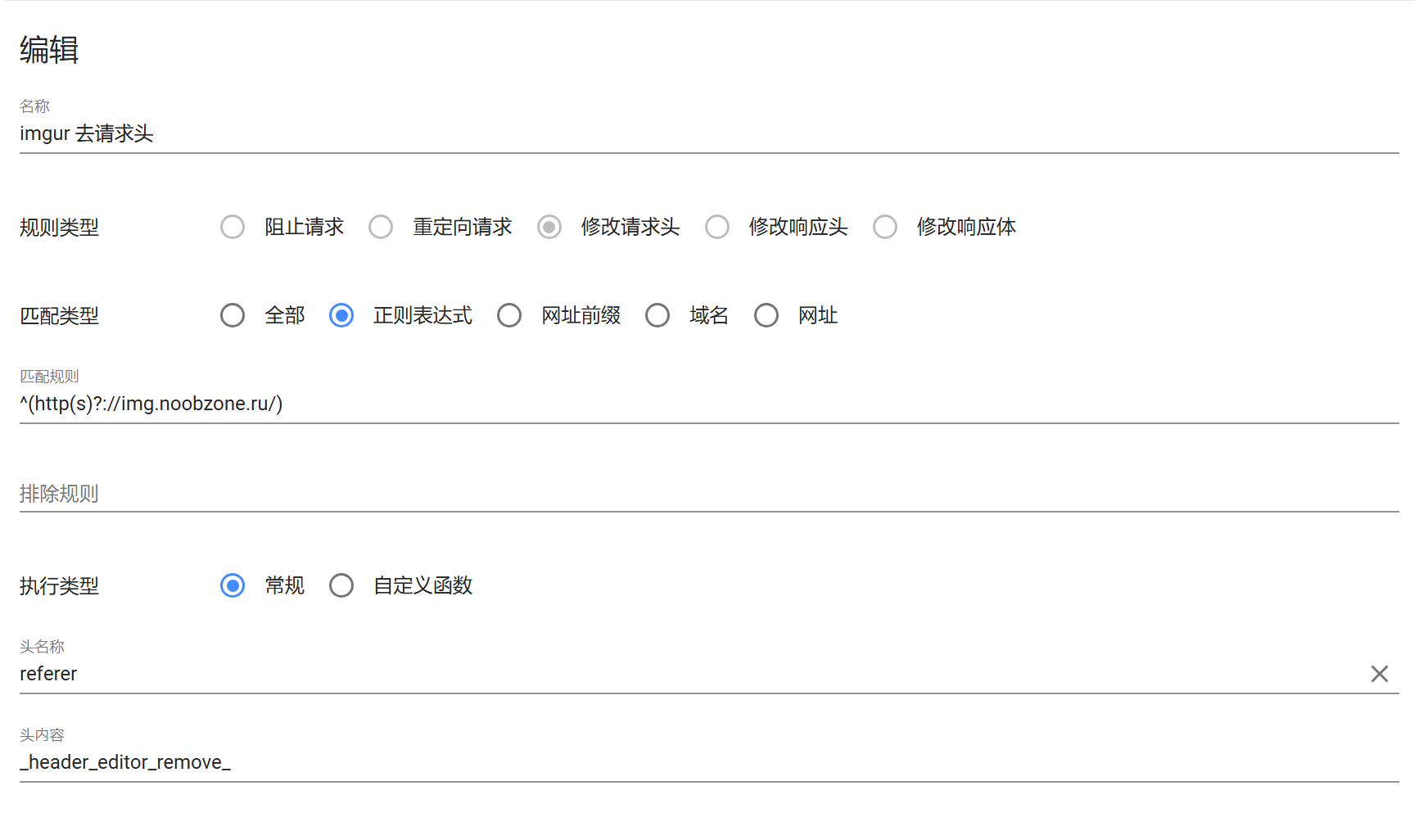
After installing the extension, you can fill in the rules following my example, or import them directly from
1 | https://gist.githubusercontent.com/shiquda/fde8daca5c45a829d063283ba41bcca4/raw/a7b80eeb251c5175b6e4e3d2fb6f497e9df7c0f9/header-editor-imgur-config |
Once imported, enabling the rules should make it work.
Limitations
This only works in the browser. If you need to access Imgur from other software, you’ll likely need some other traffic-routing software, which I won’t discuss here. Interested readers can explore and implement it on their own.
References
- The ultimate solution to image hotlink protection, super simple and practical | iTao Digital Resource Library (1itao.com)
- Imgur blocked all Oracle Cloud IPs from accessing images - US VPS General Discussion - Global Hosting Exchange Forum - Powered by Discuz! (hostloc.com)
Acknowledgments
Thanks to netizen “Guest” for the supplementary solution.